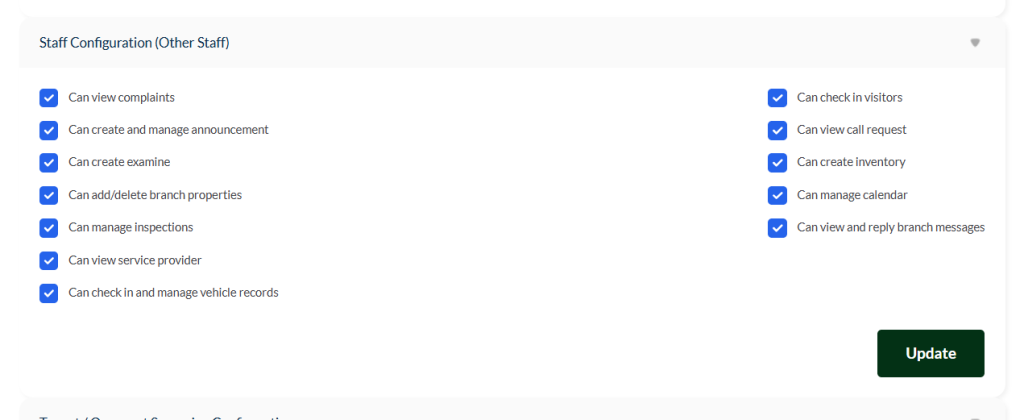
Staff Configuration #
This access level is designed for general staff members who support daily branch activities. Each permission below determines what tasks the staff member can perform. Disabling any option will limit their access to that area.
After adjusting the permissions, click Update to save your changes.
Permissions Overview #
Can view complaints
Allows staff to view complaints submitted by tenants, landlords, or clients.
Can create and manage announcements
Enables staff to post and edit announcements for branch-wide communication.
Can create examine
Grants the ability to create evaluation or examination tasks related to branch operations.
Can add/delete branch properties
Allows staff to add new property records or remove existing property entries.
Can manage inspections
Enables staff to conduct, update, and manage inspection reports.
Can view service provider
Provides access to view registered artisans or service providers associated with the branch.
Can check in and manage vehicle records
Allows staff to record vehicle entries and maintain vehicle access logs.
Can check in visitors
Permits staff to register visitors and manage visitor logs.
Can view call request
Grants access to view call requests submitted by clients or tenants.
Can create inventory
Allows staff to record and manage inventory items for the branch.
Can manage calendar
Enables scheduling and updating activities, tasks, and reminders.
Can view and reply branch messages
Gives staff access to read and respond to messages sent to the branch.
⚠️ Important: Always review the permissions you assign to branch managers and click Update to ensure all changes are applied correctly.


