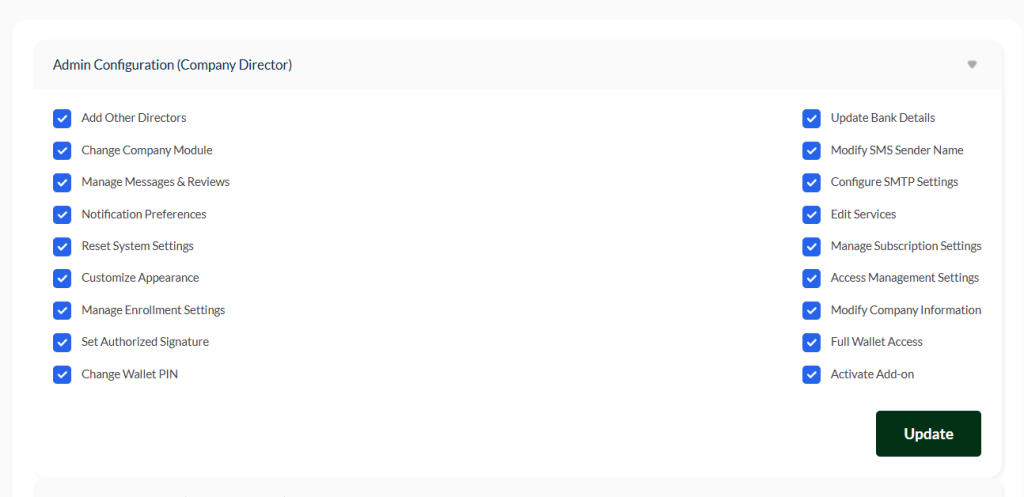
Admin Configuration #
The Company Director role has the same level of control as the company owner. To limit permissions for other users with admin roles, simply untoggle the desired feature and click Save.
To add another admin to your company, go to Settings → Others → Add Director.
In the Admin Configuration panel, each checkbox controls which features a director can access. Any permission that is untoggled will be restricted, even for users with admin roles.
Permissions Overview #
- Add Other Directors – Allows the director to add new company directors with assigned permissions.
- Change Company Module – Enables switching or updating the modules your company is subscribed to (e.g., Property Management, Developer Module).
- Manage Messages & Reviews – Grants access to view, respond, and manage client messages, inquiries, and reviews.
- Notification Preferences – Allows configuring system notifications for emails, SMS, or push alerts.
- Reset System Settings – Lets the director reset system configurations to default for troubleshooting or reconfiguration.
- Customize Appearance – Access to branding and UI settings, including logos, colors, and dashboard layout.
- Manage Enrollment Settings – Controls onboarding and enrollment configurations for staff or clients.
- Set Authorized Signature – Assigns signatures for official documents, invoices, or approvals.
- Change Wallet PIN – Ability to update the security PIN for company wallet transactions.
- Update Bank Details – Grants permission to update company bank account information for transactions.
- Modify SMS Sender Name – Allows changing the sender name for system-generated SMS messages.
- Configure SMTP Settings – Provides access to email server settings to manage email delivery.
- Edit Services – Ability to add, update, or remove services offered by the company.
- Manage Subscription Settings – Grants control over subscription plans and payment configurations.
- Access Management Settings – Configure roles, permissions, and access levels for all staff.
- Modify Company Information – Allows updating company details like name, address, or contact information.
- Full Wallet Access – Provides complete access to company wallet, including transactions and history.
- Activate Add-on – Permission to enable or disable add-ons or extra software features.
Important Note #
⚠️ If any permission is untoggled, users with admin roles will not be able to access that feature. Always review and save changes by clicking Update to ensure settings are applied correctly.


