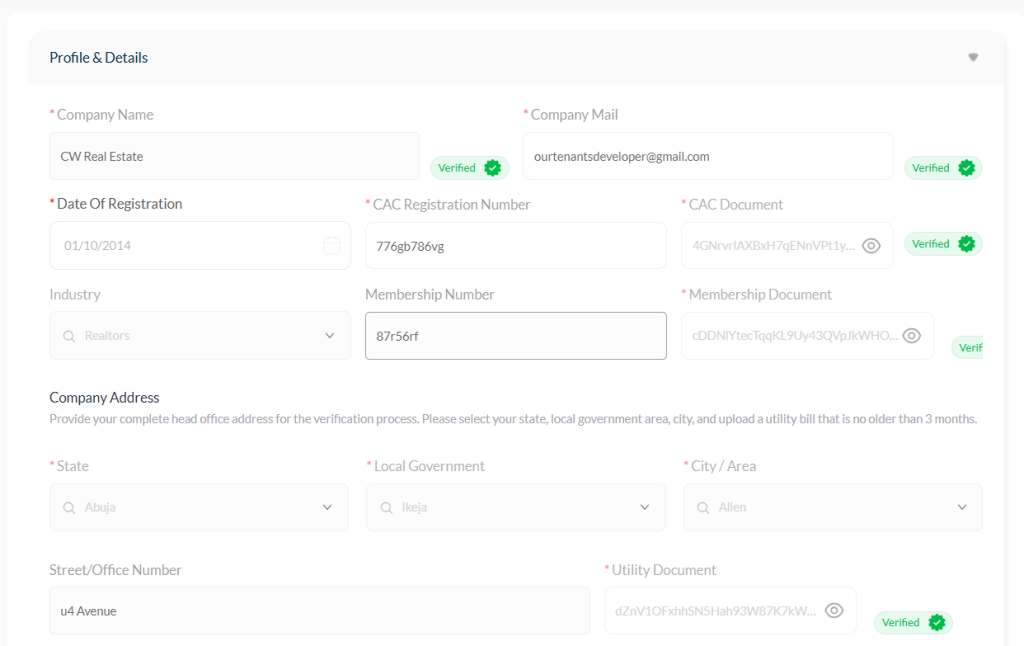
Company Information #
When setting up your account, the Company Name you entered is verified against your CAC certificate to make sure it matches your registered business.
Changing Your Company Name #
If you ever need to change your company name (for example, you have a new CAC certificate), just send an email to hello@ourproperty.ng explaining the reason for the change and attach your updated CAC document.
Want to adjust how your name appears — maybe fix a spelling or switch between upper and lower case? No problem! Send us a quick email and we’ll update it for you once verified.
Changing Your Company Email #
To update your company email address, send a message to hello@ourproperty.ng or reach out to your Account Manager.
Once your new email is approved, the old one will no longer work for login. You’ll start using the new email to access your account.
Updating Other Company Details #
Need to make several changes at once — like your CAC number, company address, phone number, or registration date?
Simply contact your Account Manager or email hello@ourproperty.ng to request a reset. This allows you to return to the setup page and re-enter your company details correctly.
Verification Process #
When you edit any company details, the update will appear as Pending until verified by our admin team.
Once verified, you can only make further edits by emailing us or contacting your Account Manager for approval.
Saving and Applying Changes #
Any update or modification made to your company listing website settings may take 40 seconds to 3 minutes to reflect, depending on your browser and internet speed.
After making changes, allow a few moments before refreshing the page to see the updates take effect.
How to Save Changes #
- After editing any section, click the “Update” button to apply the changes across your company dashboard and website.
- Once the update is successful, a confirmation email will be sent to your registered company email address to acknowledge the change.
Important Note #
⚠️ Changes will not take effect until you click the Update button.
Always save after each edit to ensure your company information stays current and visible across the platform.


