The platform offers flexible subscription plans designed to support companies of all sizes—from small property company to large real estate firms.
When you first create an account, you automatically start on the Free Plan.
If your company manages only a few properties and operates within the free limits, you can continue using the Free Plan forever.
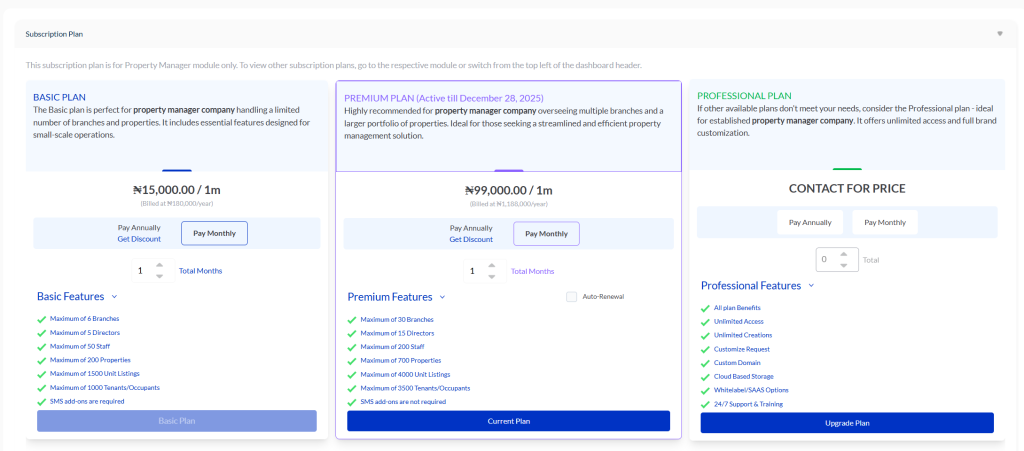
Upgrading Your Plan #
Your subscription level depends on the features, capacity, and resources your company requires.
As your business grows, you may eventually outgrow the Free Plan—for example, when you begin managing more properties, add more staff, or require additional system features. In this case, you can upgrade to the Basic Plan.
Important Upgrade Rules #
- Once you upgrade from the Free Plan, you cannot return to it.
This is because your account expands and begins to use more system resources, which the Free Plan cannot support. - The same rule applies when upgrading from Basic to Premium.
After moving to the Premium Plan, you cannot downgrade back to Basic.
Premium provides higher server capacity and advanced features that cannot be reversed.
Before upgrading, ensure your company is fully ready to operate at the next level.
Professional Package #
If your business needs exceed all standard plans, you can upgrade to the Professional Package.
This plan provides:
- Unlimited staff
- Unlimited branches
- Unlimited system capacity
- Access to every available feature and options to request for persionalize features.
To subscribe, simply contact our support team for pricing and setup assistance.
Subscription Expiry & Reactivation #
If your subscription expires and you do not renew for one or two months, there is no penalty.
We do not charge you for the period you were inactive.
During this time:
- All your company data remains safe.
- However, the company owner and all staff members will be unable to perform any actions on the system.
Once you renew your subscription, your full access is instantly restored.
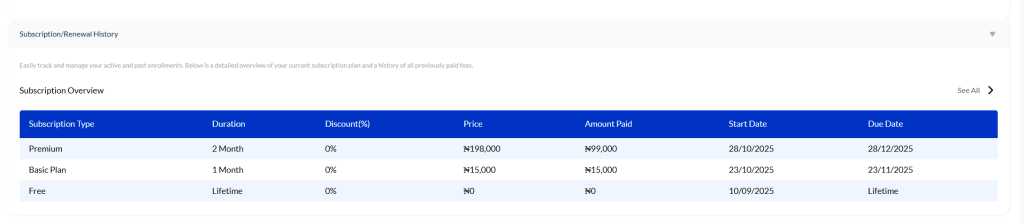
Subscription & Renewal History #
Under the Subscription & Renewal History section, you can view a complete breakdown of all payments you have made.
Click “See All” to open your full payment record.
This page displays every upgrade, renewal, and transaction associated with your account—no matter how many times you’ve subscribed.
Conclusion #
These are the key details you need to understand about managing your subscription.
Choose the plan that best supports your business growth, and enjoy seamless, uninterrupted access to your company system.


